- Nov 11, 2026
- 7 min read
MRZ Code Explained: How Machine-Readable Zones Work
A practical guide to the coded strip on passports and ID cards – what it holds, how it’s checked, and where it falls short.


Passports and many ID cards carry a strip of coded text that machines can read almost instantly: the machine-readable zone, or MRZ. Its uniform layout lets optical character recognition (OCR) technology scan and check the holder’s details. This is how passport readers at airport border control work.
MRZ technology began in international air travel, but it now supports identity checks well beyond aviation, from age verification to anti-money laundering (AML) compliance. This article explains what an MRZ code is, how it works, and why businesses use it.
What is an MRZ code?
The MRZ is the area of an identity document that holds key information about the document and its holder in a standardized format. It usually sits at the bottom of a passport’s photo page or on the back of an ID card. The MRZ code is the text written in this area, designed so machines can read it accurately. It appears alongside the visual inspection zone (VIZ), the part of the document meant to be read by people.
Origins of the MRZ standard
The International Civil Aviation Organization (ICAO) began its work on machine-readable travel documents in 1968 to speed passenger clearance through passport control.
ICAO published its initial specifications for machine-readable passports in 1980. The United States issued its first machine-readable passports in the early 1980s, and the UK followed in 1988.
What data the MRZ holds
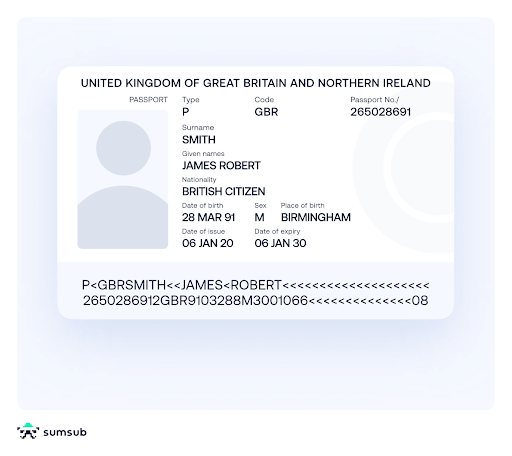
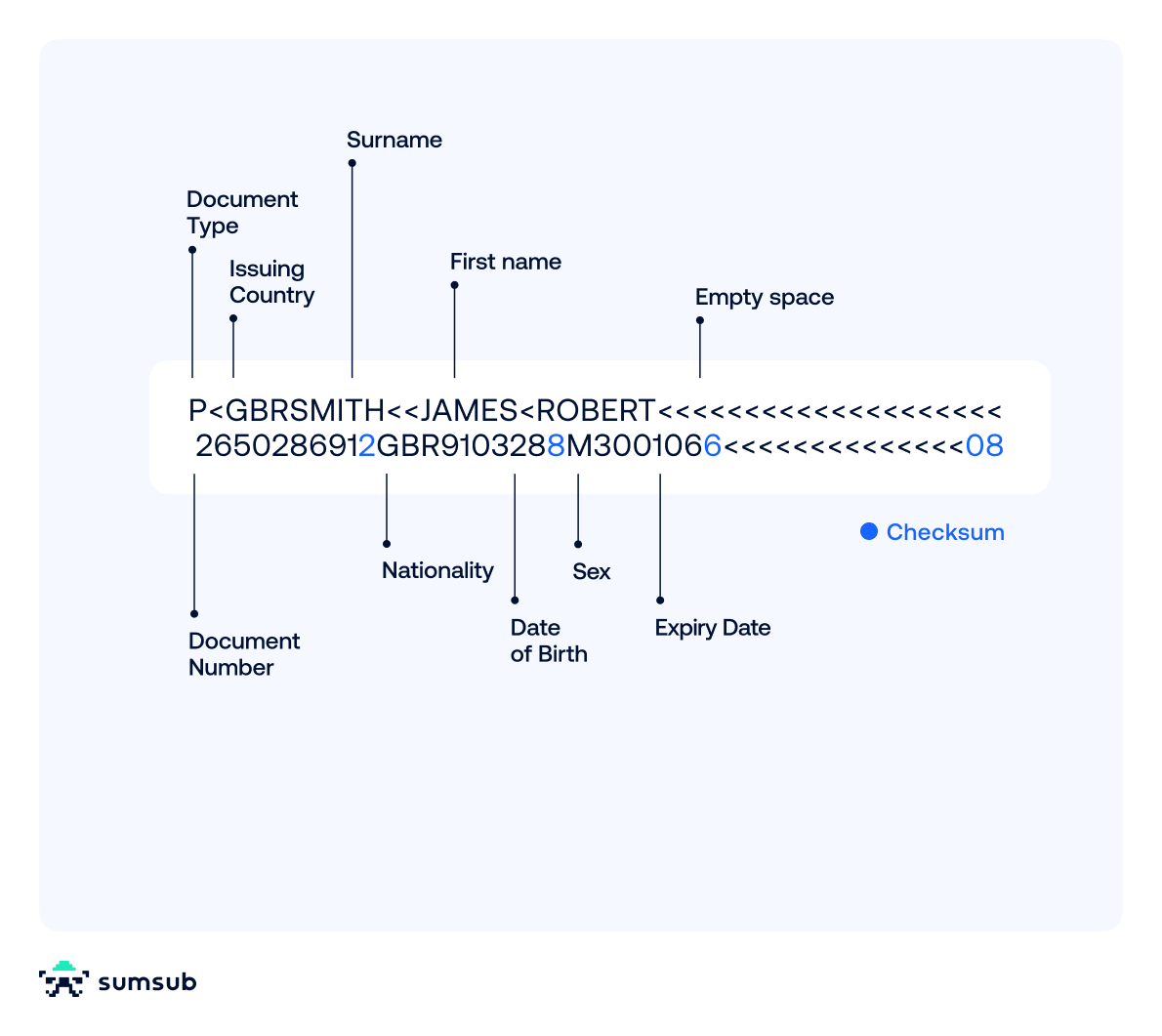
As shown in the figure above, the MRZ consists of letters, numbers, and “<” filler characters. ICAO fixes the core fields on every identity document with an MRZ; only the optional data field varies by issuer.
The MRZ includes the document type, issuing country, document number, and expiry date, as well as the holder’s name, sex, date of birth, and nationality. It also contains check digits, which let a reader confirm that key fields were captured correctly. We explain how this works below.
MRZ formats: TD1, TD2, and TD3
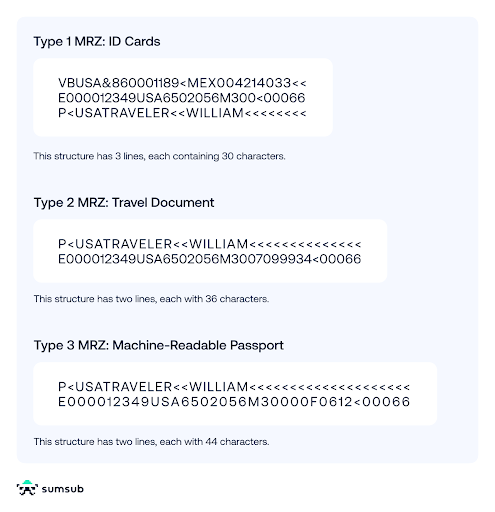
Identity documents come in different sizes, so ICAO defines a standard MRZ layout for each one. ICAO Document 9303 (Doc 9303) sets these layouts, and ICAO’s 193 member states issue travel documents to its specifications.
Doc 9303 defines three MRZ formats, one for each document size:
TD1 for ID cards and licenses
TD1 (travel document size 1) is credit-card-sized, at 85.6 × 54 mm, and used for ID cards and some other official travel documents. Its MRZ runs across the back of the card in three lines of 30 characters: the document number on line 1, the dates on line 2, and the name on line 3. ICAO’s specimen card for the fictional state of Utopia reads:
I<UTOD231458907<<<<<<<<<<<<<<<
7408122F1204159UTO<<<<<<<<<<<6
ERIKSSON<<ANNA<MARIA<<<<<<<<<<
A few driving licenses also have an MRZ, but formats vary.
TD2 for other travel documents
TD2 is less common. At 105 × 74 mm, it’s used for some ID cards and travel documents, and its MRZ has two lines of 36 characters at the bottom of the data page. ICAO’s specimen reads:
I<UTOERIKSSON<<ANNA<MARIA<<<<<<<<<<<
D231458907UTO7408122F1204159<<<<<<<6
TD3 for passport booklets
TD3 is the MRZ passport format. At 125 × 88 mm, it’s the size of a passport booklet, and its MRZ runs along the bottom of the photo page in two lines of 44 characters. ICAO’s specimen reads:
P<UTOERIKSSON<<ANNA<MARIA<<<<<<<<<<<<<<<<<<<
L898902C36UTO7408122F1204159ZE184226B<<<<<10
How machines read MRZ data
Because every MRZ follows a fixed layout, machines can read it with optical character recognition technology in three steps.
Step 1: Capturing the MRZ
First, a device captures the MRZ. This could be a passport reader at an airport, a phone camera at home, or any scanner that can capture text.
Step 2: Extracting holder and document data
Because the format is fixed, the software can split the text into its fields (name, dates, document number, and so on) and check each value separately.
Step 3: Validating checksums
The software recalculates each check digit from the field it protects and compares it with the digit printed in the MRZ. A mismatch points to a misread or an altered field. This is called “MRZ validation.” The extracted data can then be checked against databases, and the system flags anything suspicious for review.
The main advantage is speed: a machine reads the MRZ in milliseconds, which makes high-volume compliance checks practical.
How MRZ check digits are calculated
An MRZ check digit is a single digit calculated from a field, such as the document number, date of birth, or expiry date, and printed right after it. It lets a reader confirm that the field was captured correctly.
Doc 9303 Part 3, section 4.9, defines the method: a weighted modulus 10 calculation with a repeating weight sequence of 7, 3, and 1.
In the calculation, digits keep their value, letters A to Z become 10 to 35, and “<” counts as zero. Each value is multiplied by its weight, and the products are added together. The sum is divided by 10, and the remainder is the check digit.
Appendix A of Doc 9303 Part 3 gives this worked example:
- Take the date July 27, 1952.
- In the MRZ, it’s written as YYMMDD: 520727.
- Each digit is paired with a weight from the 7, 3, 1 sequence: 5→7, 2→3, 0→1, 7→7, 2→3, 7→1.
- Each digit is multiplied by its weight: 5 × 7 = 35, 2 × 3 = 6, 0 × 1 = 0, 7 × 7 = 49, 2 × 3 = 6, 7 × 1 = 7.
- The products are added together: 35 + 6 + 0 + 49 + 6 + 7 = 103.
- The sum is divided by 10: 103 ÷ 10 = 10, remainder 3.
- This remainder of 3 becomes the check digit.
MRZ and the NFC chip in ePassports
Most passports issued today are biometric passports, or ePassports: machine-readable passports with a contactless near-field communication (NFC) chip that stores a digital copy of the holder’s data, including the portrait. The MRZ and the chip work as a pair: the MRZ holds the key to the chip.
A passport reader scans the MRZ, uses the data it contains to derive an access key, and unlocks the passport’s NFC chip to establish a secure session.
The key exchange runs on one of two ICAO protocols: the older Basic Access Control (BAC) or its replacement, Password Authenticated Connection Establishment (PACE).
Under ICAO Annex 9, states that issue ePassports must implement PACE from January 1, 2027 (alone or alongside BAC), stop issuing documents with BAC from January 1, 2028, and remove all BAC documents from circulation by January 1, 2038.
Common MRZ reading errors
MRZ reading is reliable, but not error-proof. Common issues include:
- Look-alike characters. O and 0, B and 8, or S and 5 are easily confused, especially on worn documents.
- Filler confusion. “<” is sometimes misread as a letter, which corrupts names.
- Poor capture. Glare, shadows, blur, and cropped edges break OCR.
- Implementation bugs. The standard counts “<” as zero in check digit calculations, so treating it as a space produces false failures on valid documents.
- Issuer errors. ICAO acknowledges that some genuine documents carry MRZ data that does not match the VIZ, or that list country of birth as nationality.
To mitigate these errors, a good MRZ passport checker retries the capture, tests likely character swaps against the check digit, falls back to reading the VIZ, and routes genuine anomalies to manual review.
MRZ in identity verification
Border agencies and businesses use MRZ data as the starting point for identity checks. At the border, the holder’s details are checked against watchlists. Businesses screen the same data against sanctions lists, politically exposed person lists, and other watchlists. With a smartphone camera, people can even verify their identity from home.
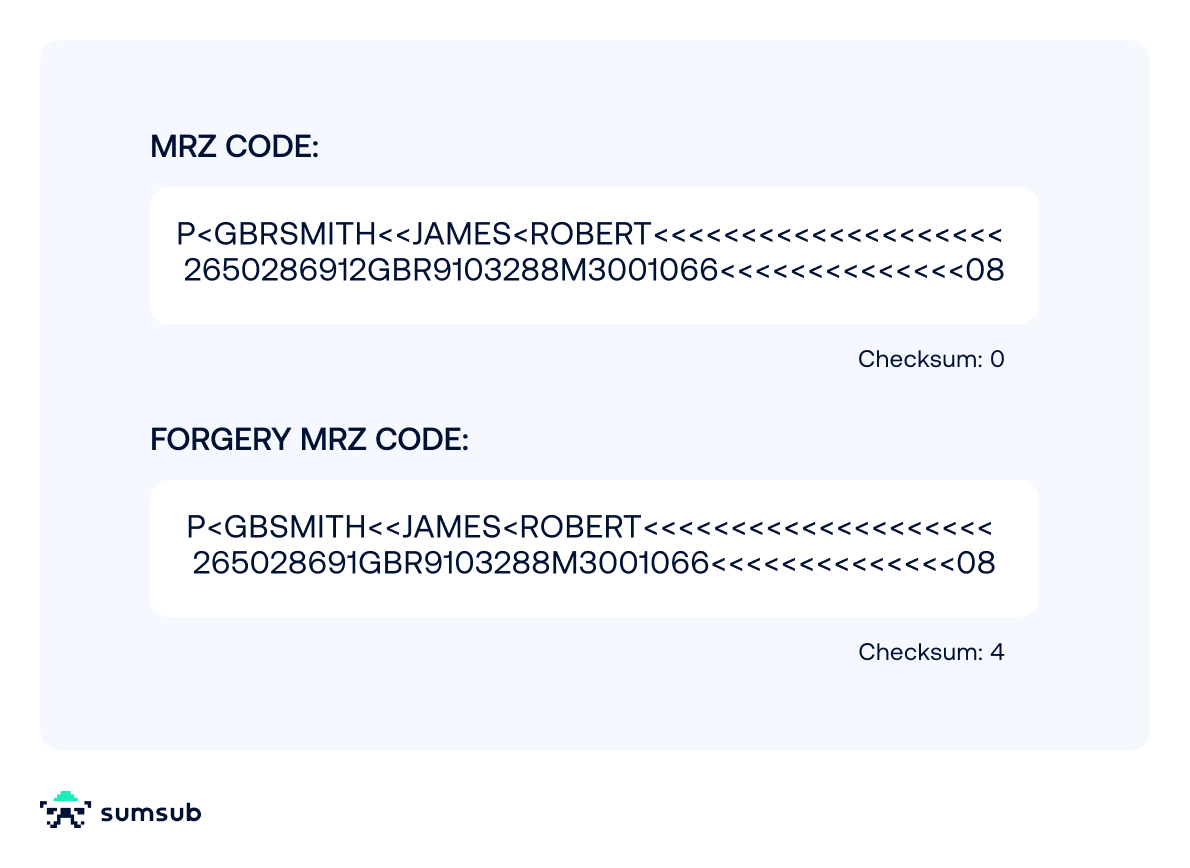
MRZ discrepancies can also expose forged documents and impostors, as official UK government guidance shows. Changing even one character in a field usually breaks its check digit. But a forger can simply recalculate the check digit, so this test alone won’t catch a competent forgery. Visual flaws, such as the wrong MRZ font, can give a forgery away too.
The MRZ makes documents faster to check, which matters wherever verification has to be quick and accurate, including:
- Customer onboarding for crypto and financial services
- Verifying travelers at passport control
- Meeting Know Your Customer (KYC) and AML requirements at financial institutions
- Checking into flights
- Preventing underage people from accessing age-restricted services, like online gambling
Suggested read: Digital IDs Are Here: How Reusable Identity Is Transforming Everyday Life
Using MRZs to detect fake IDs
The MRZ helps detect forged documents and combat fraud, whether immigration or financial.
The image below shows how forgeries can be detected.
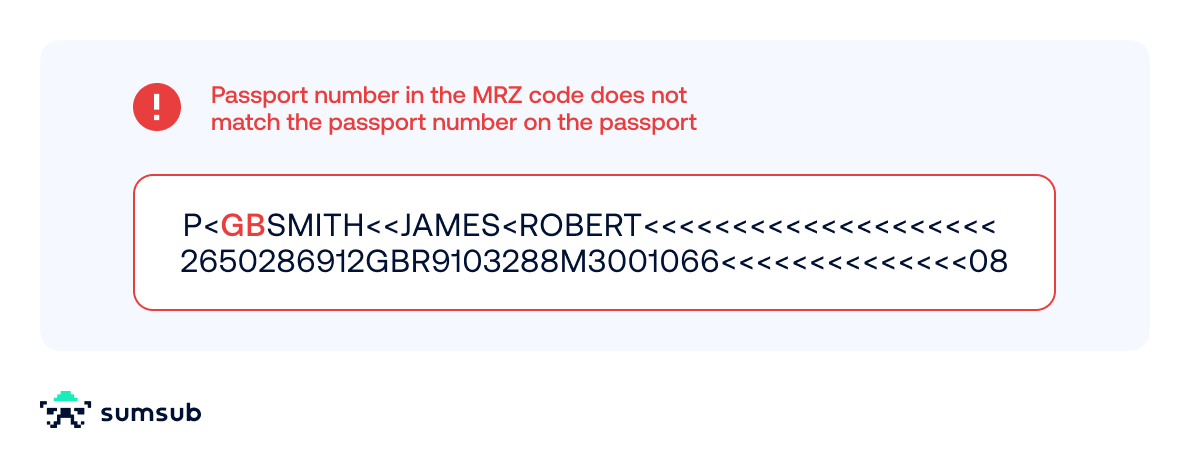
Can a fake ID pass an MRZ check?
Yes, especially if the check is shallow. Check digits prove only that the MRZ is internally consistent, not that the document is genuine. The check digit formula is public, so a forger who changes a document number can calculate the matching digit, and the altered document will pass a basic MRZ check.
Stronger document verification catches forged documents in layers:
- Comparing the MRZ with the VIZ for mismatches
- Checking the MRZ under infrared light, since ICAO requires MRZ ink to absorb near-infrared light
- Verifying the chip’s digital signature
- Matching the user’s face to the document portrait, with liveness detection
- Checking the document against issuer or watchlist data
Layered checks matter more each year: Sumsub’s Identity Fraud Report 2025–2026 found a 180% year-over-year rise in “sophisticated fraud” – coordinated, multi-step attacks that can include AI-generated documents.
MRZ for KYC, AML, and fraud prevention
As OCR spread from dedicated readers to computers, and later to smartphones and tablets, the MRZ’s use extended into areas such as AML and fraud prevention.
Once OCR extracts the holder’s details, a screening system checks them against sanctions lists and criminal databases and automatically flags matches. Because it extracts data quickly and its check digits are simple to test, the MRZ is a practical first step in KYC checks.
Because a phone or laptop camera can read the MRZ, people can complete customer onboarding remotely for regulated services, such as crypto exchanges and age-restricted platforms. Businesses get faster KYC and AML checks, and users skip an in-person visit.
Sumsub’s ID Verification reads the MRZ as one signal among many, alongside template, font, and tampering checks. For documents with a chip, data can also be read via NFC on mobile.
2027 predictions: will digital IDs replace the MRZ?
Digital IDs may eventually make machine-readable passports and other physical IDs redundant, along with the MRZ – but not in 2027.
What’s more likely is wider use of digital IDs alongside physical ones. All EU member states must offer at least one European Digital Identity Wallet by December 24, 2026. Public-sector services must accept the wallet from this date, and certain regulated private-sector services, such as banks, must follow by the end of 2027. From July 2027, the EU AML Regulation will also recognize electronic identification alongside document-based checks, which could encourage adoption.
ICAO’s Digital Travel Credentials (DTCs) point the same way. They provide a digital version of passport data, designed to accompany or replace the physical document. A world without paper passports is still years away, though, since it requires new frameworks and extensive testing. For now, DTCs are mostly in pilots, where they let travelers share verified passport data before they arrive.
Machine-readable travel documents will still be in use at the end of 2027. But because a forger can fake a consistent MRZ, layered checks will matter more.
MRZ code FAQ
What is an MRZ on a passport?
On an MRZ passport, the machine-readable zone runs along the bottom of the photo page as two lines of 44 characters. It holds the document type, issuing country, passport number, and expiry date, plus the holder’s name, nationality, date of birth, and sex.
What is the MRZ on an ID card?
On ID cards and other card-sized identity documents that have one, the MRZ is usually on the back. Most use the TD1 layout of three lines with 30 characters each. A few driving licenses also carry an MRZ, but most don’t.
How do machine-readable and regular passports differ?
A machine-readable passport (not to be confused with a biometric passport) contains an MRZ that can be scanned to extract information for faster, more accurate processing. A non-machine-readable passport must be inspected manually, which takes longer and is prone to human error. ICAO required all non-machine-readable passports to be out of circulation by November 24, 2015, so few, if any, are still valid.
Is a machine-readable passport biometric?
A machine-readable passport is not inherently biometric, as the MRZ contains only text. A biometric passport (ePassport) is a machine-readable passport with a chip that stores a digital portrait and sometimes fingerprints. Look for the chip symbol on the cover to identify a biometric passport.
What is an MRZ scanner?
An MRZ scanner captures the MRZ code, converts it to text using OCR technology, and validates the check digits. Hardware scanners at borders and airline desks often read the NFC chip as well. Phone apps read the MRZ with the camera, and many can read the chip over NFC.
Relevant articles






What is Sumsub anyway?
Not everyone loves compliance—but we do. Sumsub helps businesses verify users, prevent fraud, and meet regulatory requirements anywhere in the world, without compromises. From neobanks to mobility apps, we make sure honest users get in, and bad actors stay out.
